15.2 Basic Array Methods (20 mins)
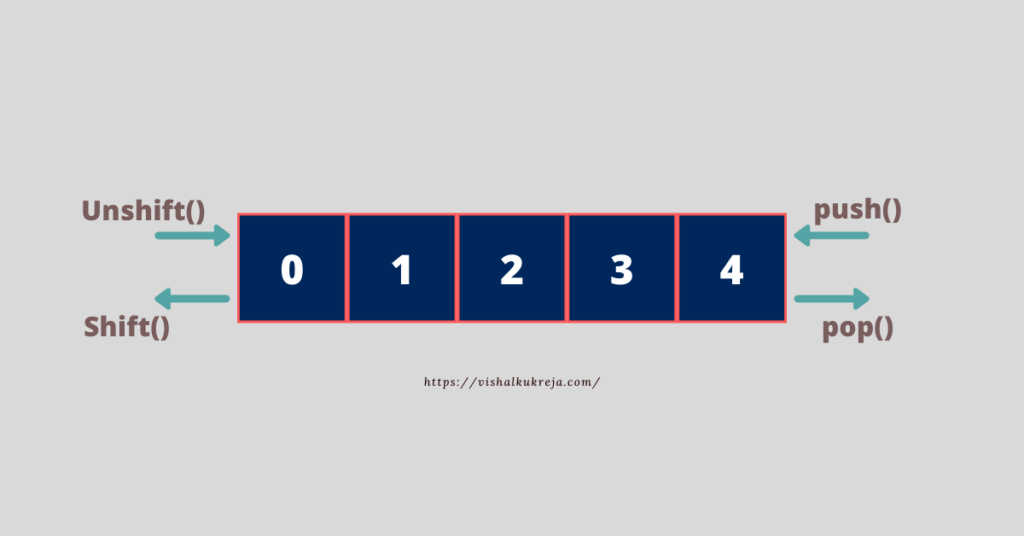
Introduction to Basic Array Methods: JavaScript provides several useful methods to manipulate arrays. These methods allow you to add, remove, and combine elements efficiently.

Array Methods:
push(): Adds one or more elements to the end of an array and returns the new length of the array.Example:
let fruits = ["Apple", "Banana"]; fruits.push("Orange"); console.log(fruits); // Outputs: ["Apple", "Banana", "Orange"]
pop(): Removes the last element from an array and returns the removed element.Example:
let fruits = ["Apple", "Banana", "Orange"]; let lastFruit = fruits.pop(); console.log(fruits); // Outputs: ["Apple", "Banana"] console.log(lastFruit); // Outputs: "Orange"
shift(): Removes the first element from an array and returns the removed element.Example:
let fruits = ["Apple", "Banana", "Orange"]; let firstFruit = fruits.shift(); console.log(fruits); // Outputs: ["Banana", "Orange"] console.log(firstFruit); // Outputs: "Apple"
unshift(): Adds one or more elements to the beginning of an array and returns the new length of the array.Example:
let fruits = ["Banana", "Orange"]; fruits.unshift("Apple"); console.log(fruits); // Outputs: ["Apple", "Banana", "Orange"]
concat(): Combines two or more arrays and returns a new array. This method does not change the original arrays.Example:
let fruits = ["Apple", "Banana"]; let vegetables = ["Carrot", "Tomato"]; let food = fruits.concat(vegetables); console.log(food); // Outputs: ["Apple", "Banana", "Carrot", "Tomato"]
Student Activity (20 mins):
Objective: Students will practice using the basic array methods to manipulate arrays by adding, removing, and combining elements.
Step-by-Step Activity:
Create an HTML file (e.g.,
arrays_methods.html) and write JavaScript code that demonstrates the use of basic array methods.Example Code:
Run the file in a browser:
Open the HTML file in a browser and use Developer Tools (F12 or right-click and select Inspect > Console) to view the results of the array manipulations.
Activity:
Step 1: Add 3 more items to an array using the
push()method, then remove the last item usingpop().Step 2: Use
shift()andunshift()to modify the beginning of an array and print the results.
Challenge:
Write a function that takes two arrays as parameters and returns a new array that combines both arrays using
concat().
Activity Follow-up Questions:
How do
push()andpop()differ fromshift()andunshift()in terms of how they modify an array?What is the advantage of using
concat()when working with multiple arrays?In what scenarios would you prefer using
shift()andunshift()instead ofpush()andpop()?
Expected Outcome:
Students will:
Understand how to use basic array methods (
push(),pop(),shift(),unshift(), andconcat()) to manipulate arrays.Practice adding and removing elements from arrays dynamically.
Learn how to combine arrays and create new arrays without modifying the original arrays using
concat().
Last updated